We’re all the same. As soon as we like a song or Shazam something, we wonder whether we want to add it to our playlists on our streaming platforms. Over the years, they have become massive, almost too big to navigate. We can’t help it! But what if we told you that one tool – just one -lets you manage everything, all in one place? Without having to tinker with your platform? How can I update, manage, sort, share, export, and download my playlists in 2026?

Soundiiz explains it all!
Key takeaways
- Managing playlists in 2026 goes far beyond simple transfers, with tools like Soundiiz letting users update, merge, split, clone, reorder, and synchronize playlists across multiple music streaming services.
- Playlist sharing now relies heavily on SmartLinks, public URLs, and cross-platform compatibility, making it easier to share Spotify, Apple Music, Deezer, YouTube Music, and TIDAL playlists from a single location.
- Downloading playlists and exporting music libraries as CSV, JSON, XML, XSPF, or text files has become essential for music backup strategies, especially as streaming platforms continue changing API access and playlist policies.
- Automatic playlist synchronization allows users to keep playlists updated daily, weekly, or monthly between streaming services, reducing manual playlist management and simplifying migrations between platforms.
AI-generated summary
Estimated reading time: 9 minutes
How can I update, manage, share, and download playlists? Soundiiz’s purpose
For 13 years, Soundiiz’s objective has remained the same: to be an all-in-one tool to simplify the use of streaming platforms for millions of people. By “simplify,” we mean “management.” Management of data streams with our world-renowned Transfer function, as well as your playlists. We know it, and you know it too: playlists are everywhere these days.
First and foremost, on streaming platforms, where increasingly powerful algorithms strive to create song lists that closely match your tastes. Spotify, Deezer, Apple Music, Amazon Music, TIDAL, YouTube Music, and Qobuz have, in some cases, invested substantial sums to improve their recommendation tools. Others adopt a hybrid approach, with journalists and curators manually selecting songs for regularly updated playlists.
Playlists are everywhere!
For streaming services, playlists and algorithms have become key battlegrounds for differentiation. The result? They’re proliferating. Some even boost careers, highlight artists, and thus represent considerable promotional opportunities for labels and singers.
And little by little, these playlists have also flourished within the personal accounts of millions of music lovers. Album formats have gradually lost their impact, and it’s not uncommon for listeners to consume only playlists, rather than entire albums. The result? Everyone creates their own playlists, based on their mood and tastes, and sometimes updates them daily.

And so, it’s not unusual for these playlists—both those we follow, those generated by platforms, and our own—to occupy a significant amount of space on our profiles. They can contain dozens, hundreds, or even thousands of songs, making them difficult to manage.
That’s where Soundiiz comes in.
How can I update, manage, share, and download playlists? What’s the point?
Updating your playlists has become impossible, or rather, extremely complicated. Streaming platforms aren’t optimized for managing playlist data. They prioritize adding tracks and constantly feeding these playlists. But what happens when you want to delete one or more songs? The process is often complicated and not very user-friendly.
Especially since no streaming platform allows you to download your playlists for storage or transfer them to another platform.
Streaming service interfaces are still rigid, and Soundiiz understands this perfectly. Accumulating data shouldn’t mean being unable to optimize it. Our tool lets you view and interact with all your data in one place.

We’ve enhanced our options over the years, and we can now confidently say that Soundiiz lets you do just about anything you want with your playlists—even things you wouldn’t have thought of! And note that this works with all streaming platforms.
You can connect them all to your Soundiiz profile to access your data directly on your dashboard. Once that’s done, what’s next? What are your options?
Stay tuned, we’ll explain everything in detail below.
How can I update, manage, share, and download playlists? Step-by-Step
The first thing you need to do, as you might expect, is to create a Soundiiz account. Simple as that.
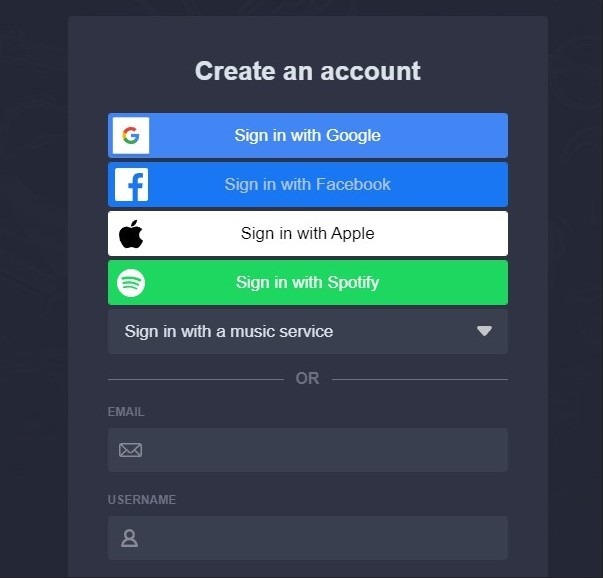
Your Soundiiz account is now created. You will then have access to your homepage, or your dashboard, if you prefer.
If you’ve never used Soundiiz before, this dashboard will be empty. You therefore need to connect the streaming platform(s) you use daily and where your streaming data is stored.
To do this, click on the “Connect Services” button on the left side of your screen.

The following window will appear:
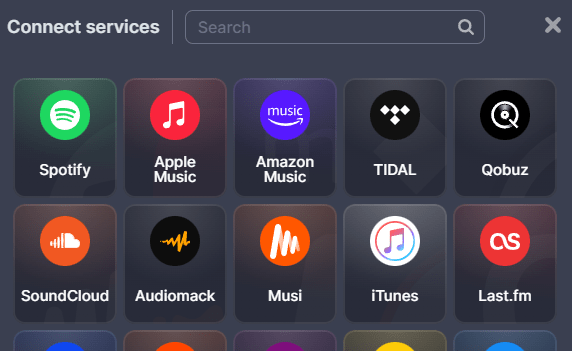
Click the platform you want to connect to. A window will then appear, asking you to authorize Soundiiz to connect to the music streaming platform you selected. Follow the procedure to connect the two services.
Note that we have forged strong partnerships with streaming platforms over our 13 years of existence, enabling us to build bridges between our tools and theirs. This guarantees optimal performance.
Once the connection is established, you will magically find all your playlists in the “Your Library” category, under the “Playlists” section.
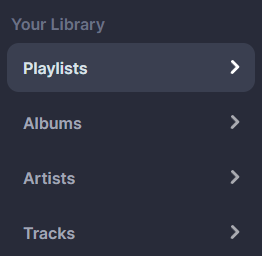
You then have two options.
You can perform global actions on your playlist: transfer it, synchronize it, share it, clone it, merge it with another playlist, export it, split it, sort it according to various criteria, empty it, delete songs added twice by mistake, or delete it.

That’s quite a lot, isn’t it? We warned you: Soundiiz aims to be as comprehensive as possible!
The other option is to work more specifically with the songs contained in your playlists. To do this, click on the name of your playlist. The list of its songs will then appear. By checking the box to the left of the song name, you can transfer that track to another playlist, download it in the format you want, add it to another playlist, share it, or delete it.

The bonus? All the changes you make to your playlists will be reflected on your streaming platform. Soundiiz updates your data for you in seconds.
And all of this works perfectly without you having to subscribe or pay anything.
The free version of Soundiiz lets you manage all your data directly on your dashboard and select up to 200 tracks from each playlist, even if it contains more. However, if you want to do more than just edit or back up your playlists, we offer two paid options, with no commitment. You can find details of these subscriptions here.
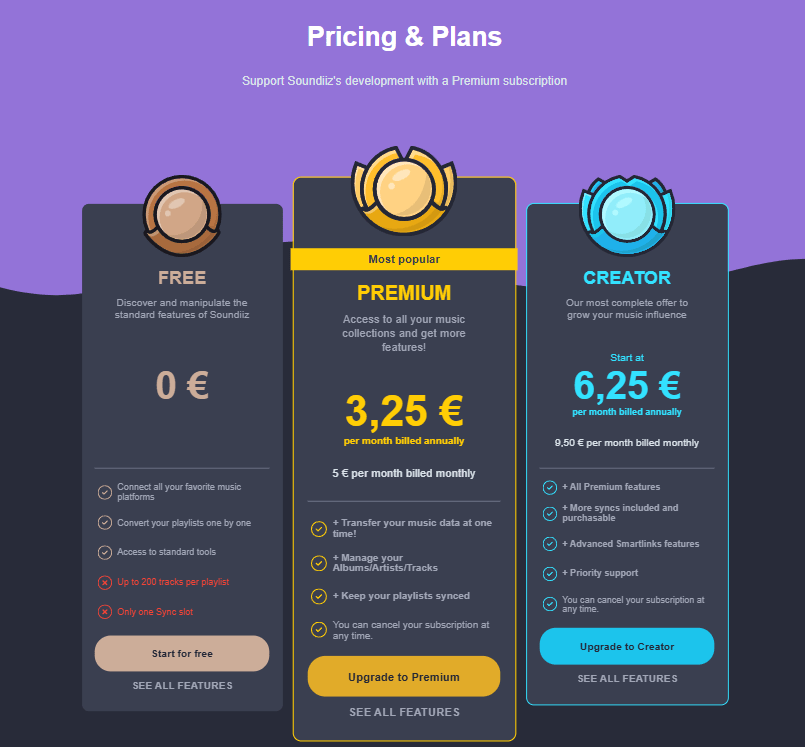
What else can you do with Soundiiz?
As we mentioned, Soundiiz is an all-in-one tool. This means that we not only allow you to manage your data, but also to do a whole host of other things. We talked a lot about playlists in this article, didn’t we? Well, Soundiiz has developed its own AI-based playlist-generation tool. We want you, our users, to benefit from playlists that closely match your tastes, but above all, we want you to be in control of what you listen to.
Thanks to Soundiiz’s playlist generation tool, you move from a passive approach—the one you naturally adopt when using streaming services, where they use your data to suggest things to you—to an active one. You can enter text prompts describing what you want to listen to, or enter criteria and ask Soundiiz to generate playlists for you.

And the best part? You can then export these playlists to your streaming platforms and, if you choose, they will be updated at a defined frequency without you having to lift a finger! Convenient, right?
In addition to AI-powered playlist generation, Soundiiz lets you create SmartLinks to promote your playlists or music (if you’re an artist). Or you can sync playlists from a streaming platform other than your own to the one you use.
To try out all our services, click here!