To transfer your music playlists and data between Spotify, Apple Music, YouTube Music, Amazon Music, Deezer, TIDAL, and more, you’ll need a third-party app. Soundiiz allows you to transfer everything in just a few minutes, with a very high success rate. It also lets you fix transfer errors with just a few clicks. Learn how to transfer playlists, songs, albums, and artists between Spotify, Apple Music, YouTube Music, Deezer, TIDAL, Amazon Music, Qobuz, and other streaming services: here is the step-by-step process.

Estimated reading time: 17 minutes
How can I transfer music playlists and data between music services?
The easiest way to transfer a playlist is to use a playlist transfer service such as Soundiiz. Connect your source and destination music services, select the playlists or other music data you want to transfer, and start the transfer. Soundiiz matches tracks from the source catalog with equivalent tracks available on the destination platform. Tracks that cannot be matched are reported after the transfer and can be manually fixed.
Here’s the step-by-step procedure:
- First, create a Soundiiz account and log in.
- On your dashboard, click the “Transfer” tool located on the left side of the screen.
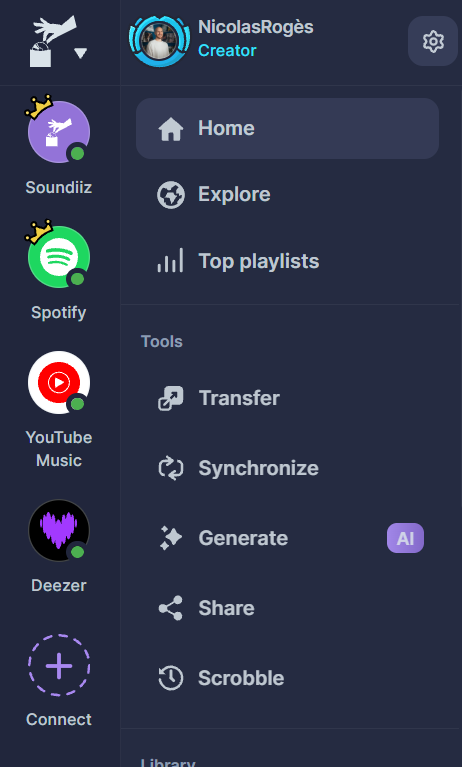
- Connect the platform you currently use and the one you want to migrate your data to. Therefore, you must have an account on the destination platform for the transfer to work.
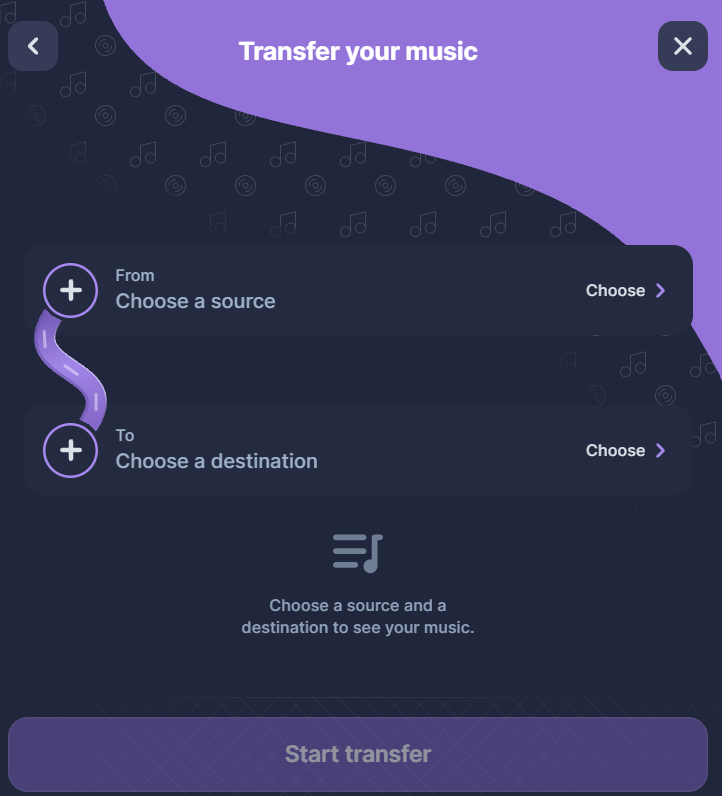
- Choose your source—the platform where the data you want to transfer is stored—and your destination—the platform to which you want to transfer that data.
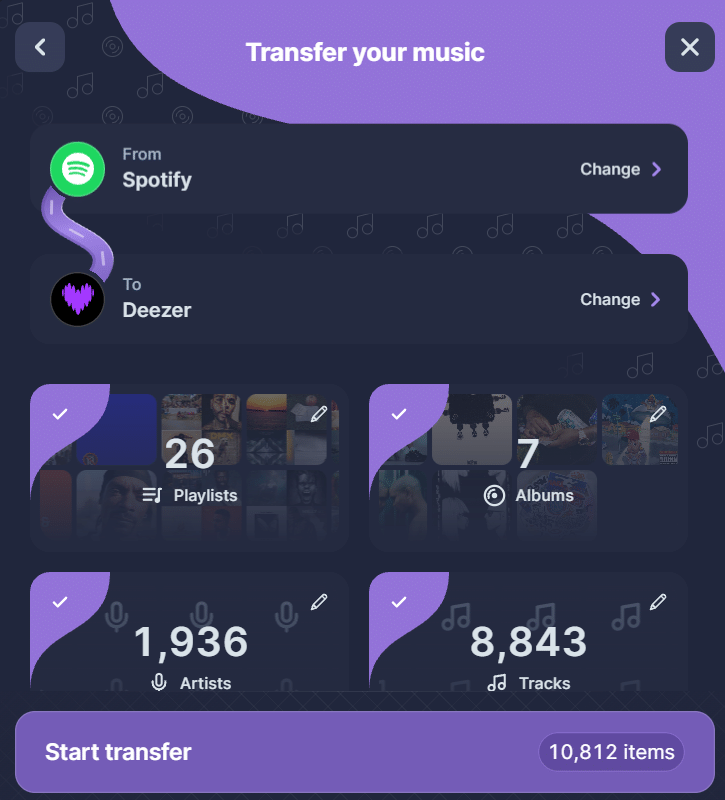
- Soundiiz displays the number of items in your library, broken down into four categories: playlists, saved albums, followed artists, and songs (either favorited or in your playlists). You can transfer all these items at once or just specific ones. In this example, we are choosing to transfer only a single playlist.
- To customize what you want to transfer, you have two options:
- Deselect one of the four categories.
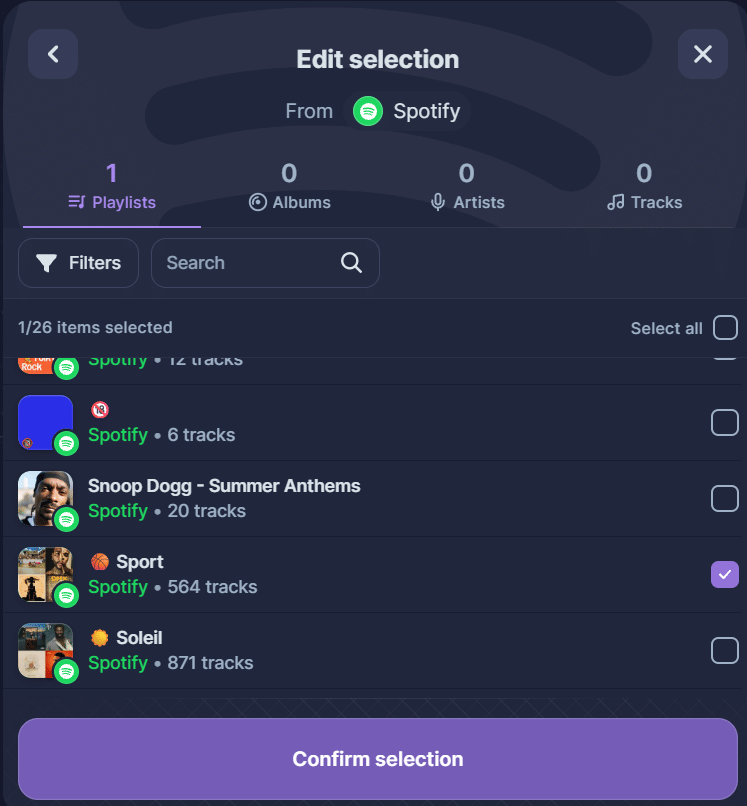
- Edit the categories. To edit a category, click on one of the four squares and select the specific items you wish to transfer. For instance, here we are deselecting all playlists, except one.
- Once you have finished making your selection, click “Start transfer.” Soundiiz is now transferring your data!
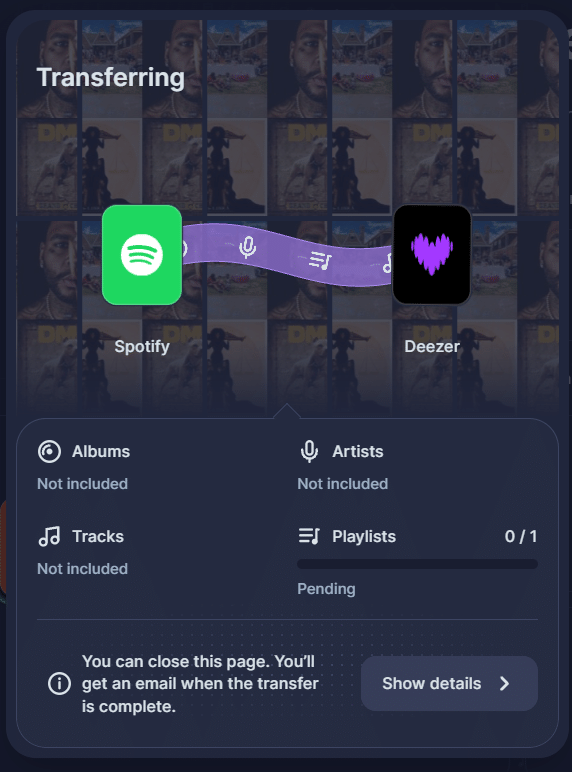
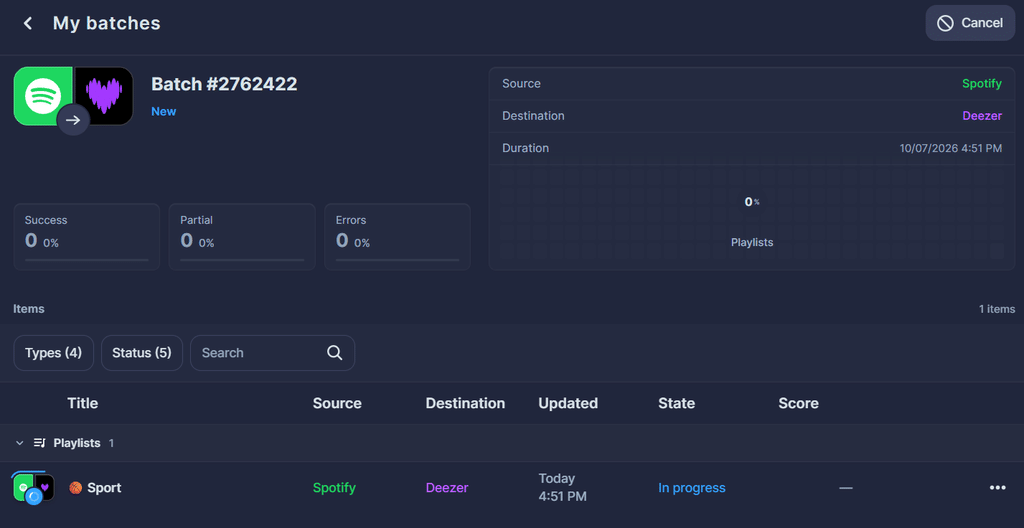
- To track the transfer progress, you can either click “Show Details” in the pop-up window that appears or click “Batch” in the “Automation” section of your dashboard (located at the bottom left of the screen).
- Once the transfer is complete, Soundiiz displays a transfer rate of 100% or lower in the “Batch” section.
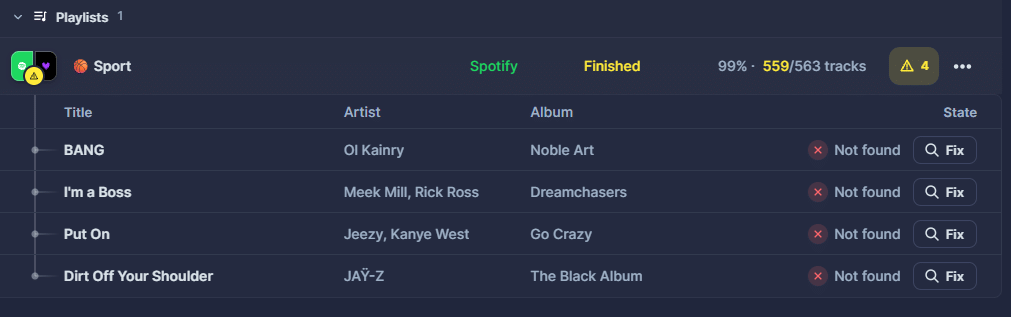
- To fix any errors, click the “Fix” magnifying glass icon to the right of each song title, and look for the same song on your destination platform’s catalog.
- Your transfer is complete!
- You’ll now find your data on your destination platform.
Can songs go missing after a playlist transfer?
Some songs may not be transferable when migrating data between music services. There are several possible reasons for this:
- Metadata differs between platforms.
- Some songs in your playlists may have been uploaded as local files from your computer. As a result, these songs don’t exist on a streaming service in an official, licensed capacity.
- Various unpredictable issues arise from platforms’ efforts to keep customers within their own ecosystems.
How can I fix transfer errors?
When you transfer data using Soundiiz, the service displays a “transfer rate” once the process is complete. This rate may be 100% or lower; if it is below 100%, one or more songs couldn’t be transferred.
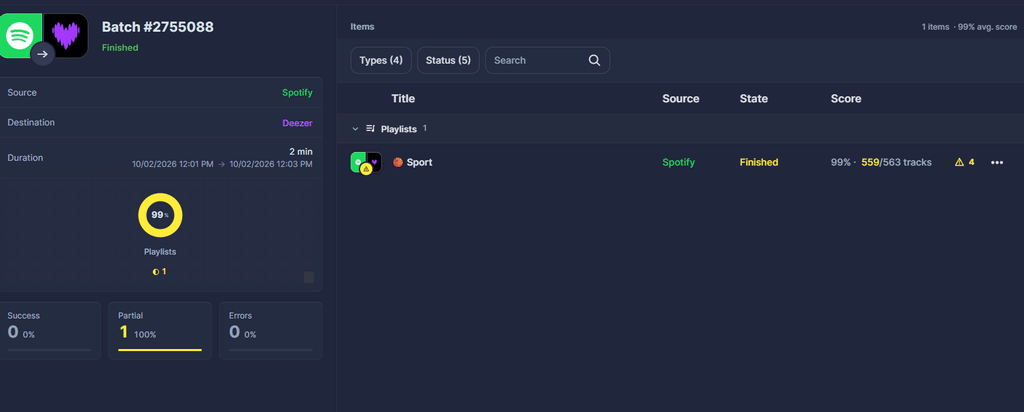
Don’t panic: Soundiiz will identify the problematic songs for you. By using the “Fix It” magnifying glass icon next to any song marked as an error, you can search for that specific track within the catalog of the platform to which you are migrating your data.
You can find the detailed procedure in our guide to fixing missing songs after a playlist transfer.
Why would I transfer music playlists and data between music services?
You might find yourself in several situations:
- Your current platform has raised its subscription price
- You want to take advantage of a better recommendation algorithm
- Another service offers a feature that suits your needs
- You want to migrate your data to an audiophile-focused platform, such as TIDAL or Qobuz
- You care about artist compensation and want to move your data to a service that pays more per stream
- Your platform’s interface is too cluttered and no longer appeals to you
- You are a heavy podcast listener and want to use a service that offers podcasts alongside its music catalog
There are countless other reasons why you might want to transfer all your streaming data; the list above covers only a fraction of them. Whatever your motivation, it is valid simply because it is yours. To meet these needs, you need a tool that is reliable, secure, user-friendly, and efficient—like Soundiiz.
Which music services can you transfer playlists between?
Soundiiz supports more than 40 music streaming services, including Spotify, Apple Music, YouTube Music, Deezer, TIDAL, Amazon Music, Qobuz, SoundCloud and more.
| Using Soundiiz’s transfer tool, Transfer your data from: | To: |
| Spotify | Apple Music, YouTube Music, Deezer, TIDAL, Amazon Music, Qobuz |
| Apple Music | Spotify, YouTube Music, Deezer, TIDAL, Amazon Music, Qobuz |
| Deezer | Spotify, Apple Music, YouTube Music, TIDAL, Amazon Music, Qobuz |
| YouTube Music | Spotify, Apple Music, Deezer, TIDAL, Amazon Music, Qobuz |
| Amazon Music | Spotify, Deezer, Apple Music, YouTube Music, TIDAL, Qobuz |
| TIDAL | Spotify, Apple Music, YouTube Music, Deezer, Amazon Music, Qobuz |
| Qobuz | Spotify, Apple Music, YouTube Music, Deezer, TIDAL, Amazon Music |
How do you identify the songs, playlists, and artists you are transferring between music services?
When transferring a song from one platform to another, Soundiiz must locate the corresponding version on the destination platform—a process known as “matching.” To match songs, Soundiiz utilizes various music metadata, such as:
- ISRC
- UPC
- Featured artists
- Mixes
- Duration…
These identification tools help us recognize songs across platforms and ensure an optimal transfer. We can handle complex data, such as remixes, karaoke versions, acoustic covers, sped-up tracks, and more.
For instance, if you “like” a song on Spotify, Soundiiz will “like” the same song on Deezer, provided it exists there. However, because metadata and catalogs vary between services, matching isn’t always possible or exact. While Soundiiz strives for perfection, in rare instances, we may be unable to find the corresponding song, album, or artist. If that happens, we have a solution!
Are transfers between music services secure?
As a French platform, Soundiiz is subject to the European General Data Protection Regulation (GDPR). This regulation is among the strictest and most demanding in the world. Furthermore, we regularly update our tools to ensure they remain fully aligned with European security guidelines.
Why is this so important? In the age of AI, many people are attempting to create applications with goals similar to our service. Using chatbots, they write code to build software without any technical background.

However, because these services lack years of industry experience, they tend to be incomplete, inefficient, and short-lived—and, above all, they often fail to comply with security regulations. They can pose a genuine risk to your data. This is yet another reason to choose Soundiiz—a service with years of expertise—to manage your music streaming data.
Is it legal when you transfer music playlists and data between music services?
Our tools come from partnerships forged over the past 13 years with more than 40 streaming platforms. With legal access to their APIs (Application Programming Interfaces), we can securely manage complex data while complying with the platforms’ legal requirements.
While we handle your music streaming data, we never download songs or albums, as we do not hold rights to copyrighted content. Our services are 100% legal and comply with all legal requirements regarding artists and their labels. Because we are completely independent of all streaming platforms, we can offer transparent, balanced services.
Proof of this is that major streaming platforms quickly trusted us. When TIDAL launched in 2015, the American company featured us as a partner on its website. This attracted Forbes’ attention, strengthening our credibility and professionalism and increasing our visibility among streaming industry players and the general public.
In 2026, with over 12 million registered users and more than 350 million playlists transferred to date, Soundiiz has become an essential player in the music industry. We also recently partnered with Qobuz, a music streaming platform that offers the highest sound quality and among the highest artist remuneration.
Why is Soundiiz the best solution to transfer music playlists and data between Spotify, Apple Music, YouTube Music, Amazon Music, Deezer, TIDAL, and more?
Three other major transfer tools exist: TuneMyMusic, FreeYourMusic, and SongShift. These are efficient platforms that meet a wide range of needs. However, we do not believe they are as comprehensive or reliable as Soundiiz. You can consult our comparison of playlist transfer tools for a closer look at these services.
From the very beginning, Soundiiz has been committed to doing more than just transfers; we aim to become the ideal companion for every music enthusiast. That is why, even though we are known for our transfer capabilities, we have expanded into SmartLinks, synchronization, AI-generated playlists, scrobbling, favorites management, data storage, and more.

Soundiiz is highly valued by users who not only need to switch streaming platforms but want a reliable, transparent, and secure tool to manage their music libraries. It supports more than 40 services and keeps helping after the first transfer.
Our dashboard, our features, and our commitment to continuously updating our tools to meet as many needs as possible make Soundiiz a service that truly listens to its users while looking toward the future.
That is why Soundiiz is the most comprehensive option. It doesn’t just cater to people looking to transfer their data from one platform to another once; it serves the entire community of music lovers.
To sum it up:
| Soundiiz | TuneMyMusic | SongShift | FreeYourMusic |
| The best choice overall, with 45 services, accurate playlist and data transfers, detailed data organization, cross-platform syncs, exports, AI features, scrobbling, SmartLinks, and many other tools. | A good choice for a quick one-time transfer through a browser. | A nice option if you are in the Apple ecosystem | Interesting thanks to its native desktop apps for frequent syncs |
Frequently Asked Questions
Can I use Soundiiz for a one-time transfer?
Yes. You can use Soundiiz just to move your music collection once. If you choose a paid subscription for the transfer, you can cancel it afterward if you no longer need it.
How does Soundiiz transfer playlists?
Soundiiz reads the playlist on your source service and uses track metadata—such as title, artist, and album—to find corresponding tracks in the destination catalog. Tracks that are unavailable or cannot be matched are listed in the transfer report.
Will a transfer delete my source playlists?
No. Transferring with Soundiiz copies your selected music to the destination. Your source playlists and favorites remain unchanged.
How long does a transfer take?
Transfer time varies depending on the number of tracks and the music services involved. Large libraries and busy services can take longer.
What should I do if a track cannot be found or is incorrectly matched (e.g., live version, remix, cover)?
Since platforms have different catalogs and metadata, mismatches can occur. You can use the “Fix” button on tracks not found after a transfer, or configure “Matching rules” in your settings.
Can Soundiiz upload or distribute my own audio files (MP3, WAV)?
No. Soundiiz cannot upload audio files or create new releases in a music store’s catalog. It is designed solely to match playlists or metadata with tracks that already exist in the platforms’ catalogs.
Can I recover or undo a playlist deleted by mistake?
No. Soundiiz does not keep backup copies of your playlists or favorites. The “Recent Transfers” history only shows execution reports, not the track content itself. In the event of an accidental deletion, you must use the recovery tools provided by your original music platform.
Can Soundiiz see my streaming service password?
No. For the vast majority of platforms (Spotify, Apple Music, YouTube Music, etc.), Soundiiz uses the secure OAuth protocol. Your music service hosts the login page; Soundiiz receives only a temporary access token for the permissions you approve, without ever intercepting your login credentials.
Can I export my playlists to a file format readable on my computer?
Yes. Soundiiz allows you to export your playlists as text-based metadata files (such as CSV, TXT, or JSON) or standard playlist formats (like M3U or XSPF). Please note: this exports a text list (titles, artists), not the actual audio files.
Can I import a playlist from a simple text or Excel file?
Yes. Using the import tool, you can upload a CSV or TXT file. If you list one song per line (in an “Artist – Title” format), Soundiiz will read the text to search for and recreate the corresponding playlist on your chosen streaming service.
Why are some music services not available on Soundiiz?
For a platform to be compatible, it must provide a stable public API that allows you to read or write music data. If a service denies third-party access, changes its technical restrictions, or shuts down its data servers, Soundiiz cannot reliably integrate with it.
Are the transfers available for all platforms?
Soundiiz supports transfers between a wide range of major music streaming platforms, including Spotify, Apple Music, TIDAL, Deezer, Qobuz, YouTube Music, SoundCloud, and Amazon Music. We’ve ensured our tools are compatible with as many technologies as possible. Most compatible tracks can be transferred automatically, while unavailable or unmatched tracks are reported for manual review.
How much does it cost to transfer playlists between music services?
Soundiiz offers a Free plan and paid plans. If you want to transfer several playlists at once or move your favorites, you can choose a paid plan. You can compare the current options on our pricing page.
How do I cancel my subscription?
If you purchased a subscription on the Soundiiz website, open Settings, go to Plan, and select Cancel. Follow the confirmation steps. See the guide if you cannot find your subscription.
How do I transfer a Spotify playlist to Apple Music?
Connect your Spotify and Apple Music accounts to Soundiiz, open the Transfer tool, and select the playlists you want to move. Soundiiz will find the corresponding songs in Apple Music and recreate your playlists there. You can follow our Spotify to Apple Music transfer guide for the full procedure.
How do I transfer Spotify playlists to YouTube Music?
Connect Spotify and YouTube Music to Soundiiz, then choose Spotify as your source and YouTube Music as your destination. Select your playlists and let Soundiiz do the rest. Our Spotify to YouTube Music guide walks you through the process.
How do I transfer a Spotify playlist to Deezer?
Use Soundiiz’s Transfer tool to connect Spotify and Deezer, then select the Spotify playlists you want to bring with you. Soundiiz searches for the songs in Deezer’s catalog and adds the matches to your new playlists. You’ll find the steps in our Spotify to Deezer guide.
How do I transfer a Spotify playlist to TIDAL?
To bring your Spotify playlists to TIDAL, connect both services to Soundiiz and choose the playlists you want to transfer. Once the transfer is complete, you can check the results and use the Fix feature for any unmatched songs. Follow our Spotify to TIDAL guide to get started.
How do I transfer Spotify playlists to Amazon Music?
Connect Spotify and Amazon Music to Soundiiz, select your Spotify playlists, and choose Amazon Music as the destination. Soundiiz will recreate the playlists with the songs available in Amazon Music’s catalog. See our Spotify to Amazon Music transfer guide for the full procedure.
Can I transfer playlists for free?
Yes. Soundiiz Free never expires and lets users transfer as many playlists as they want, one at a time. A source playlist can contain more than 200 tracks; users can select up to 200 tracks for a free transfer. The first 200 tracks are selected by default, and you can change the selection before starting. This limit applies to each playlist, not a cumulative quota across the account.
If you wish to transfer more songs at once, you can subscribe to one of the Premium plans. The good thing is that you can subscribe for a one-time transfer and then unsubscribe from Soundiiz.
Why are some songs missing after a playlist transfer?
Some songs may be missing after a playlist transfer because the destination service does not have the same catalog, metadata, regional availability, or version of the track. Local files and platform-exclusive content may also be unavailable. When a track cannot be automatically matched, Soundiiz identifies it so you can search for an alternative version using the Fix feature.
Can I transfer 1,000+ songs?
You can transfer as many songs as you like with Soundiiz’s transfer tools. If you wish to transfer more than 200 songs in a single playlist, you can subscribe to one of our Premium plans.